Point at the part. The agent revises the geometry.
Mesh is an agentic CAD workbench for 3D-printable parts. A live 3D viewer and an agent chat pane sit side by side in the browser; the agent writes CadQuery geometry, and the regenerated STL appears within a fraction of a second. Click the face that's wrong, type what's wrong with it, and the agent gets the comment back with its model-space coordinates.
[ ok ] uvx annealage-mesh ./part · available now · free for non-commercial use
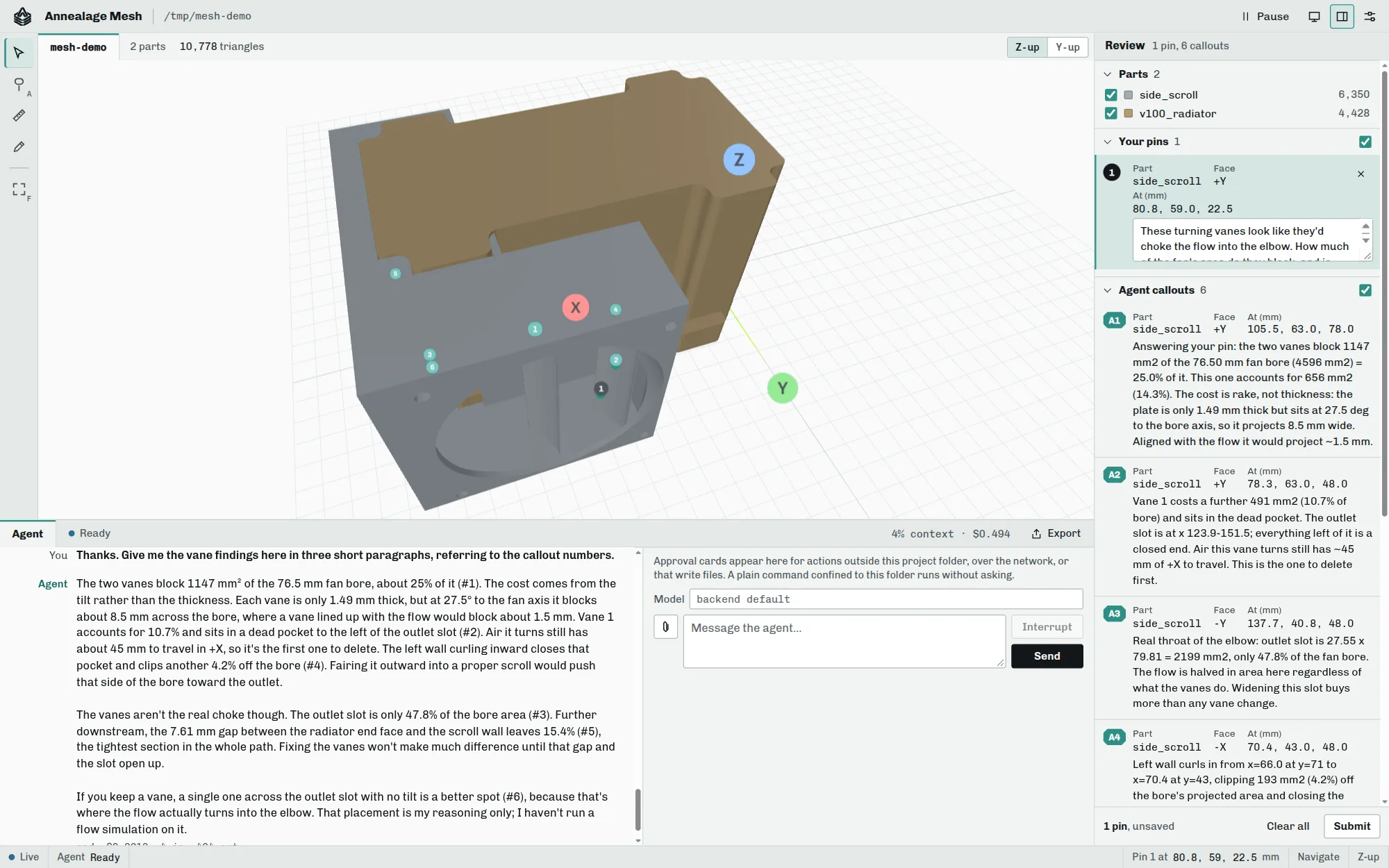
Pins both ways, on the same model.
Switch to Add pin, click the model, and type a comment against that point. Submitted pins carry the part, the click point and the surface normal in model units, so the agent maps each comment straight to the line of the CAD script that made it.
The agent pins back. Its callouts, a point and a note each, appear live in the viewer, so a question about a wall or a measurement of what clips the bore sits on the geometry it's about, not in a paragraph.
- pins Human comments at exact model-space coordinates, with part and normal.
- callouts The agent's own pins, drawn live in the viewer.
- measure Pick any two pins for ΔX/ΔY/ΔZ and the direct distance.
- sketch Draw on the 3D view and send it as an image; paste or drop photos too.
Bring the agent in the chat pane, or your own.
SHEET 02 / CHAT · CONTRACTThe agent works the viewer as well as the folder: it moves the camera, hides and shows parts, captures what's on screen, and pins callouts. Pause holds the view still while you line up a shot or type a comment.
Chat pane beside the viewer
Claude, Codex or omp as the backend, switchable per run, with image attachments, interrupt, a per-turn cost and context readout, and kept sessions you can resume. On a phone the panes become tabs.
Two JSON files and MCP tools
An agent running outside the chat pane reads
mesh-comments.json and writes
mesh-callouts.json in the served
folder, plus MCP tools for STL verification and the measured
dimensions file.
A contained shell, and a card for everything else.
The agent's shell runs sandboxed, so regenerating a part inside the project folder doesn't ask. Anything that writes through the edit tools, leaves the folder, or reaches the network arrives as an approval card with the full command or file contents: allow it, allow it for the session, or deny it with a reason the agent reads verbatim.
A served folder's own .claude/settings.json
or .mcp.json can declare hooks that run
shell commands, so Mesh won't start the agent in that folder until you
accept those files, recorded against the exact contents you read.
- sandbox bubblewrap + socat on Linux, the built-in sandbox on macOS. Agent mode won't start uncontained.
-
secrets
Credential paths such as
~/.sshand~/.awsare refused to the file tools and to shell commands that name them. - viewer Reading and moving the view never asks; callouts, screenshots and dimension writes do.
- bind 127.0.0.1 by default, with a per-run token in the URL.
A parametric CadQuery project, scaffolded for you.
Point Mesh at a folder and it sets up a dimensions.json
for caliper measurements, a model.py with
PEP-723 inline dependencies, and helper scripts that keep OCCT honest,
then starts the server and opens the browser.
- 01 evidence Measured values live in one file; derived numbers are computed in the script.
-
02 scaffold
uv run model.pymodels the reference hardware first, then the part against it. - 03 solids Fillets that fall back instead of failing, and checks for silent boolean failures.
- 04 verify Section probes and a watertightness check before you see the part.
- 05 print Orientation, splitting hollow parts, plate layout, volume-guarded watertight export.
Point it at a folder.
SHEET 03 / INSTALLRun it from PyPI
With uv there is nothing to install first. Python 3.10+; the viewer is served locally and needs no network.
uvx annealage-mesh ./part
# or keep it as a tool
uv tool install annealage-mesh
Linux: the sandbox tools
Agent mode needs these to contain the shell. macOS needs nothing; annealage-mesh view needs neither.
apt install bubblewrap socat
Pick a backend
Claude uses the Claude Agent SDK (about 90 MB, it bundles the CLI); Codex and omp install separately.
annealage-mesh ./part \
  --backend claude --save-default
Subcommands, sessions, remote access, and the file contract for external agents live in the Mesh docs.